
Docs
Bot Soul and Core Memory
How SOUL.md and MEMORY.md start every Session, their size limits, and when edits apply.
Every PersonaBot has two special files at the root of its Memory: SOUL.md is its Soul and MEMORY.md is its Core Memory. Both go into the system prompt at the start of every new Session, so the Bot knows who it is and what it remembers before it says a word, without searching its files first. Other Memory files are not added automatically; the Bot reads them with its tools when it needs them.
Why it works this way
Without standing content, every new Session starts like waking up with no memory: the Bot doesn't know what its Memory holds, so it has to search, list folders and open files one by one before it recalls what you agreed on. With MEMORY.md, the Bot sees an index of "what I remember and where it lives" before its first reply.
Both files are frozen for a Session: they are read once when the Session starts, and the Session keeps that version even if the files change on disk. That keeps the start of the system prompt byte-for-byte the same every turn, so the model provider can reuse its prompt cache, and a long conversation isn't re-billed or slowed down each time memory changes. The trade-off is that edits apply from the next Session or the next compaction, described below.
What each file is for
| File | Name | What goes in it |
|---|---|---|
SOUL.md |
Soul | Who the Bot is: character, voice, and the working principles it always follows. The persona you write at creation lives here. |
MEMORY.md |
Core Memory | The memory the Bot always carries: mostly an index pointing to the Memory files that hold the details, plus a few key facts it must never forget. |
They differ in how fast they change. The Soul rarely changes, and changing it often means the Bot becomes someone else. Core Memory grows and gets reorganized as you work together.
Bots from earlier versions used PERSONA.md. On the first start after upgrading, it is renamed to SOUL.md and committed to the Memory's Git history, with its content unchanged.
Why there is no USER.md
Some agent products add a USER.md that describes "the user". DeepSeekBot doesn't: a PersonaBot works with many people across Channels, groups and projects, so there is no single user. What a Bot remembers about a person lives in ordinary Memory files, like what it remembers about a customer or a project (for example people/alex.md), indexed from MEMORY.md. Remembering a person works the same way as remembering anything else, and more people don't crowd the system prompt.
Where to find them
Open Bot DM → Channel sidebar → Memory files. SOUL.md and MEMORY.md are pinned at the top with a Standing badge, followed by their current size and limit:
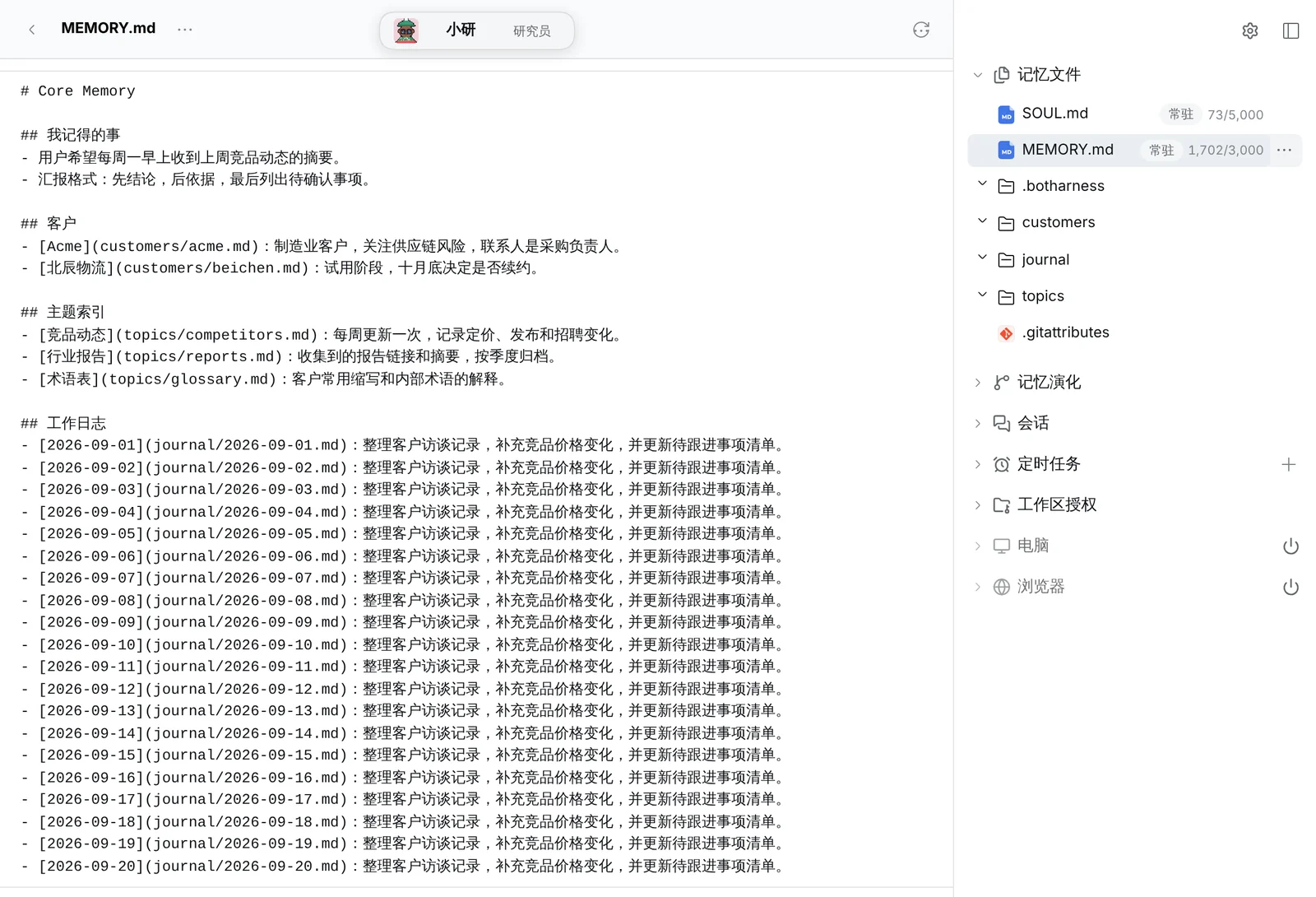
Click a file name to read it. Hover over the usage to see the percentage of the limit.
Size limits
Each file has its own limit, counted in characters: one Chinese character, one letter, one space or one punctuation mark each count as one. Characters are the unit because you can count them yourself, while token counts depend on the model.
| File | Default limit | Roughly |
|---|---|---|
SOUL.md |
5,000 | 5,000 Chinese characters, or about 830 English words |
MEMORY.md |
3,000 | 3,000 Chinese characters, or about 500 English words |
Token counts can only be estimated, since they depend on the model's tokenizer:
- Chinese: about 0.6 to 1 token per character. Both files filled to the default limits come to about 5,000 to 8,000 tokens.
- English: about 1 token per 4 characters. Both files filled to the default limits come to about 2,000 tokens.
This content is part of every Session. Because it doesn't change during a Session it can hit the prompt cache, so it usually isn't billed at full price every turn, but it does take up context window.
Change the limits
- In the Bot DM, click the Bot's name at the top, then click View details in the profile card.
- Under Standing memory limits, enter the character limits for Soul and Core Memory. Any whole number from 500 to 50,000 works; the approximate size in Chinese characters and English words is shown below each field.
- Click Save limits. Restore defaults sets them back to 5,000 and 3,000.
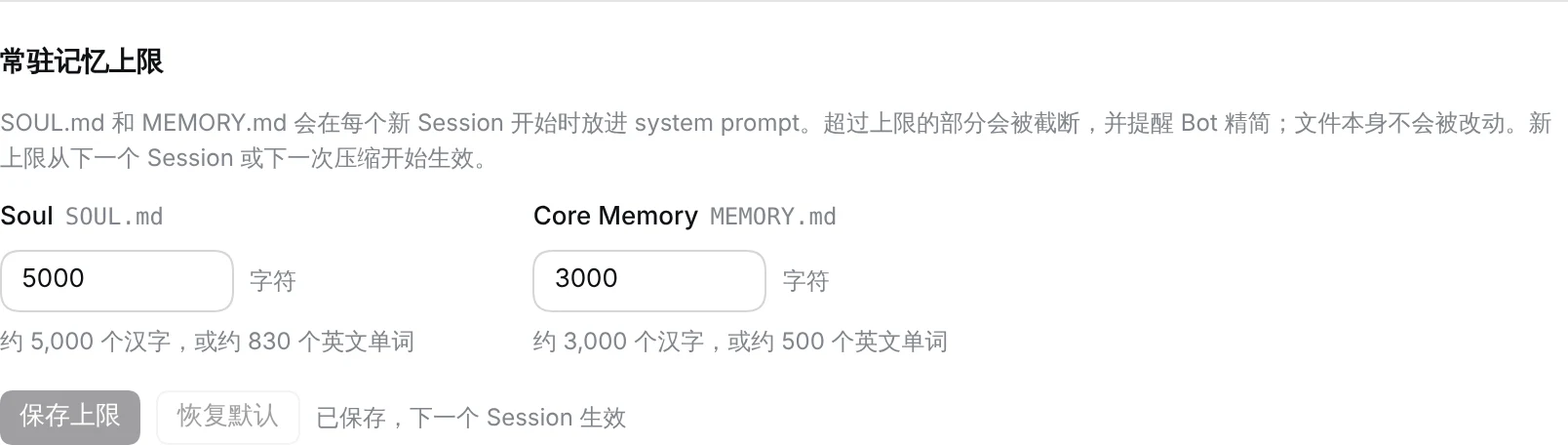
The limits belong to this Bot only.
When a file is over its limit
The file itself is never changed or cut. Only the part past the limit stays out of the system prompt: the Bot sees the content up to the limit, followed by a line telling it the file is too long and should be consolidated, and that the full file is still on disk. In Memory files, the usage of an over-limit file turns red:
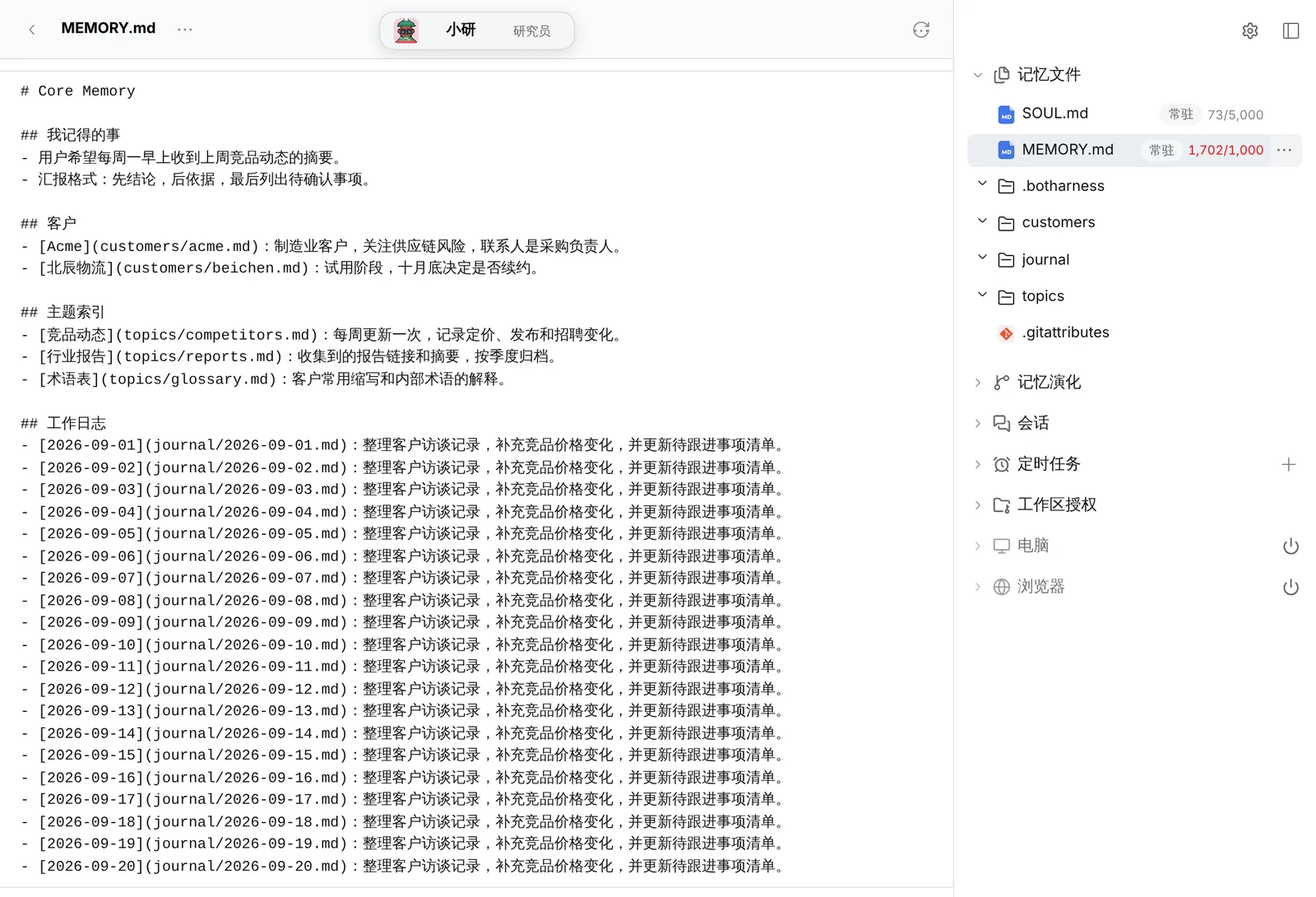
A log that grows every day, like the one above, belongs in its own files. You can ask the Bot to tidy it up, for example: "Your MEMORY.md is over its limit. Move the details into topic files and keep only the index and the most important facts in MEMORY.md." Or raise the limit.
When changes take effect
Changes to either file, and to the limits, take effect at whichever comes first:
- the start of the Bot's next Session;
- the next compaction of the current Session.
Until then, the running Session keeps the version it started with. The Bot knows this: when it updates MEMORY.md mid-Session, it doesn't assume it now "remembers" the new version, and reads the file like any other Memory file when it needs to.
The Bot can edit both files with its memory tools, and you can edit them on the Host in any editor (see Open files on the Host for where they are). Every change lands in the Memory's Git history, where Memory evolution shows it and lets you go back.
Shape MEMORY.md together with your Bot
A new Bot gets a short MEMORY.md that only explains what the file is for, with no fixed format. How it is organized is something you and the Bot settle over time. There's no right answer, but a few principles help:
- It's an index, not a store. Details go in topic files;
MEMORY.mdsays in a line or two what is where. That keeps it under the limit and tells the Bot where to look. - Keep only what should come to mind every time. Ask: if the Bot didn't know this at the start of a new Session, would it make a mistake or make you repeat yourself? If so, it belongs here. If not, a topic file is enough.
- Tidy it now and then. Memory grows on its own. Ask the Bot to move outdated entries and finished projects to an archive file, or remove them.
A good way to start is to talk it through with the Bot:
Look at what's in your Memory now, then reorganize MEMORY.md so that next time a new conversation starts, you know what you remember and which file holds the details. Tell me how you plan to organize it first, and we'll agree before you change it.
After that, whenever you find yourself thinking "it forgot again", that's a good moment to adjust MEMORY.md.
Related: Memory files, Memory evolution, Share a Bot.